From Our New Site

Our new Website

Our New Website : www.grandapk.blogspot.com

Saturday, December 29, 2012

Best Free Web Browser for Android (Direct Download Links Are Available)

Download Best Free Web Browser for Android:

Various factors may affect the decision as to your final browser. I discuss these factors in more depth below, and then will try to offer a review of every browser. I plan to extend the reviews over time, in response to feedback and experience, so do check back or leave a comment below if there's something you would like to see.

Limiting Factors

1. Small screen size & resolution.

The smaller the screen, the more important it is that your browser does not waste any of that valuable screen real estate with superfluous buttons. If screen size is limited, you may in fact find that the built in browser is best customised to work with your hardware restrictions. If you want to try alternatives though, features like full screen mode and good zoom and pan controls are a must. The ability to effectively re-wrap text to fit within the screen as you zoom will also be essential.
1st Choice:         Dolphin Mini
Alternative:        Opera Mini

2. Low powered device

On a low powered device, you want the browser to load quickly and add the minimum of overhead. You may well be best ignoring features such as Flash (often resource hungry) and add-ons in order to obtain snappy browsing speeds
1st Choice:   Dolphin Mini
Alternative:  Opera Mini

3. Limited data connection speed/limit

Websites are getting bigger...
In the early years of the Internet when dial up modems were the norm, website designers would spend hours honing their sites to be the smallest possible, to ensure a speedy experience for their users. With the advent of cheap broadband that is largely no longer the case. Instead designers seem sometimes locked in a battle to see how many images and flashing ads they can fit on one page at once!
However, on a mobile, data speeds can still be in dial up modem territory. Whilst 3G and (in some places) 4G have helped, the extra speed often comes with a pathetically small data limit, even on so called 'unlimited' data plans.
If you regularly browse image laden websites, or spend all your time watching YouTube videos, you might find that you hit your data cap sooner rather than later. If you're lucky, you'll just be limited to a slower speed until the end of the month - if you're not so lucky you'll suddenly find charges on your bill for the extra data.
Some of the browsers below attempt to help, by collecting the pages for you on their servers, compressing larger images and files, then squirting the smaller, leaner file to your mobile device. In most cases, you won't notice the quality difference, but you may notice the faster load times.
If you are on a very small data cap, or need the fastest browsing you can on a slow data speed, then the clear choice here is Opera Mini (or Opera Mobile if the phone is more capable). Both these browsers include the 'Opera Turbo' technology, which aims to reduce the amount of data each webpage uses.
Note: For the privacy conscious amongst you, the Opera Turbo technology means in effect that Opera acts as a 'proxy' for your connection and could, in theory, read everything your browser shows. If you are using secured browsing (https://) websites then the connection is direct and this cannot happen. In practice, this is unlikely to be an issue for many, but it is something to be aware of.
1st Choice:    Opera Mini
Alternative:   Opera Mobile

4. Current desktop ecosystem

It may not appear initially relevant, but this factor could end up being the decisive factor in your choice. If you run a  particular browser on your main computer, and want to sync bookmarks easily between your PC and android device, then you will need to choose one that is compatible. In most cases that will mean using the same software on both, although in a few cases there are workarounds.
In general however, the Opera Android browser will only sync with the Opera desktop browser, Firefox and Chrome likewise.
You may need to decide whether the ability to sync bookmarks is important to you. If you tend not to browse the same pages on both, or in fact specifically want to keep the bookmarks separate, then you can ignore this factor entirely when making your decision.
If you do want to sync though, bear in mind that when browsing certain sites on your Android device, the site may detect you are using a mobile browser and serve up a different page without some of the frills, giving you a different experience. There are ways to avoid this, although often the mobile pages are easier to use on a smaller device and more touch friendly.
There are alternatives that will synchronise your bookmarks between any browser but they are generally not free and so outside the scope of this website.
1st Choice: dependent on users' needs

5. Compatibility / Accessibility

For some, the websites you surf will restrict your choice of browser. Particularly in corporate environments, internal web apps may only work on certain browsers. Services such as banks, which require you to log in, may not work well on certain mobile browsers, if at all. Many browsers are also not well adapted to those with accessibility issues, such as limited vision, poor finger control. In this area, the reviewers' knowledge is limited so any suggestions, comments or experience is welcomed in the comments below. In general however, it may be that Dolphin Browser is the one to work best here, purely because it has so many add-ons, some of which may make it easier to customise the browser to your specific needs
1st Choice: Dolphin Browser HD
 
Reviews
Below are the ongoing reviews. However, I plan to add to these in the coming weeks. Currently on my list to review are:
  • Maxthon Mobile
  • Skyfire
  • Firefox
  • Chrome (beta - Android 4+ only)
If anyone has others to suggest, I'm happy to add them. Please comment below.

Opera MobileOpera Mobile is still the browser to beat for all round performance, reliability and ease of use. The experience Opera have from their desktop browser shines through with simple touches that make all the difference to an excellent browsing experience. When scrolling in a long page, a simple 'jump to top/bottom' navigation button will pop up. If clicking on an area with several links, the browser will automatically zoom in to allow you to choose the correct link.
Along with that it has the most reliable Flash support in my experience, multi-tab browsing, a simple user interface, full bookmark and browsing history support, a built in download manager, the ability to save a page for future reading, and Opera's 'Turbo' feature, using their servers to compress your pages and images to save on download times and data costs. If you only have one browser on your Android device, it should be this one.
The only criticisms are slightly confusing management of multiple tabs and a lack of add-ons, along with no quickly accessible full screen mode.

Opera MiniOpera Mini is designed as a fast and light browser for those who have slow download speeds or high data costs. As pages are browsed, Opera's servers fetches them and compresses images to provide a faster browsing experience. This does require accepting Opera's ability to protect your privacy, although all the evidence is that they do (and https secure browsing is always encrypted end to end). It doesn't offer Flash support, but if you are in a poor connection area or want to manage your download then Opera Mini is a good choice as it has most of the features of its bigger brother and runs on practically any device of any age.
The drawback is that some more advanced pages will not render correctly and Flash/video is not an option. You must also accept the privacy implications of retrieving all your data through Opera's servers, although this is unlikely to be a major issue for most.

Dolphin Browser HDDolphin Browser HD has long been a fixture on the Android platform and they have always tried to keep ahead of the pack by adding features. They also supply Dolphin Mini (see below) but this is their most powerful offering, with all the features you would expect on a mobile browser and many you might not.
The app features easy multi-tab browsing, excellent bookmark and browsing history support, multi-touch zooming, simple navigation, Flash and HTML5 support, versatile add-ons, gesture control and a unique 'Sonar' voice recognition feature.
The interface in particular is excellent, with a swipe from the left side of the screen opening a bookmarks/history menu, and a swipe from the right giving you immediate access to installed add-ons
If you like to tinker and want the most features, Dolphin is an excellent choice and the choice of add-ons is impressive.
Note that there have been privacy concerns with Dolphin in the past, although they have addressed them in more recent updates.

Dolphin Browser Mini
Dolphin Browser Mini is the little brother of the full featured HD browser, and is designed to be lighter, simpler, and less resource heavy. Despite this, it still has the same excellent multi-tab browsing, bookmarks management, multi-touch zooming and Flash support with less of the clutter which will appeal to some, especially on slower devices.
If you want to browse almost anything, but without the memory and resource footprint, Dolphin Browser Mini should certainly be high on your list.
The only drawbacks are lack of the excellent add-ons support of its bigger brother, and the slightly less sophisticated interfa

Quick Selection Guide

     Opera Mobile
Gizmo's Freeware award as the best product in its class!

Runs as a stand-alone program on a user's computer
Easy to use layout and menu system - Fast Performance - Tabs support - Full Flash support & Good HTML5 Support - Excellent text wrap and useful navigation buttons
Occasional issues with stability on some devices - No Add in support - Only syncs with Opera on desktop
Download: Direct Download Link
http://www.opera.com/mobile/  
12.00
14MB
Unrestricted freeware
There is no portable version of this product available.
Android 1.6+

Flash support may depend on specific device
     Dolphin Browser HD  
Runs as a stand-alone program on a user's computer
multi-tab browsing, bookmarking and syncing, Flash and HTML5 support, versatile add-ons, Easy bookmark management and access, extensive feature set and regular updates.

bloated features may cause slow performance, occasional glitches with Flash playback, potential privacy concerns
Download: Direct Download Link
8.0.1
3.0 MB
Unrestricted freeware
Android 2.01 +
Runs as a stand-alone program on a user's computer

Small footprint, fast performance, intuitive layout, Flash support

Limited browser syncing to desktop, privacy concerns for some (see review)
Download:Direct Download Link
http://www.dolphin-browser.com    
2.3
1,014k
Unrestricted freeware
There is no portable version of this product available.
Android 1.6 +
      Opera Mini  
Runs as a stand-alone program on a user's computer

Fast and resource light - Opera compression technology to reduce data usage - Tab support - Supports 96 languages

No Flash or HTML 5 support. Doesn't re-flow Text
http://www.opera.com/mobile/
Download:Direct Downlaod here 
7.0.29703
857k
Unrestricted freeware
There is no portable version of this product available.
Android


Tags
best free browser for android, best free mobile web browser, top free mobile web browser, best free web browser for mobile device, free browser for smart phones running android,web browsers,opera android,android opera mini,dolphin android,dolphin hd browser,android browser download links.


Download Best Free Web Browser for Android:

Various factors may affect the decision as to your final browser. I discuss these factors in more depth below, and then will try to offer a review of every browser. I plan to extend the reviews over time, in response to feedback and experience, so do check back or leave a comment below if there's something you would like to see.

Limiting Factors

1. Small screen size & resolution.

The smaller the screen, the more important it is that your browser does not waste any of that valuable screen real estate with superfluous buttons. If screen size is limited, you may in fact find that the built in browser is best customised to work with your hardware restrictions. If you want to try alternatives though, features like full screen mode and good zoom and pan controls are a must. The ability to effectively re-wrap text to fit within the screen as you zoom will also be essential.
1st Choice:         Dolphin Mini
Alternative:        Opera Mini

2. Low powered device

On a low powered device, you want the browser to load quickly and add the minimum of overhead. You may well be best ignoring features such as Flash (often resource hungry) and add-ons in order to obtain snappy browsing speeds
1st Choice:   Dolphin Mini
Alternative:  Opera Mini

3. Limited data connection speed/limit

Websites are getting bigger...
In the early years of the Internet when dial up modems were the norm, website designers would spend hours honing their sites to be the smallest possible, to ensure a speedy experience for their users. With the advent of cheap broadband that is largely no longer the case. Instead designers seem sometimes locked in a battle to see how many images and flashing ads they can fit on one page at once!
However, on a mobile, data speeds can still be in dial up modem territory. Whilst 3G and (in some places) 4G have helped, the extra speed often comes with a pathetically small data limit, even on so called 'unlimited' data plans.
If you regularly browse image laden websites, or spend all your time watching YouTube videos, you might find that you hit your data cap sooner rather than later. If you're lucky, you'll just be limited to a slower speed until the end of the month - if you're not so lucky you'll suddenly find charges on your bill for the extra data.
Some of the browsers below attempt to help, by collecting the pages for you on their servers, compressing larger images and files, then squirting the smaller, leaner file to your mobile device. In most cases, you won't notice the quality difference, but you may notice the faster load times.
If you are on a very small data cap, or need the fastest browsing you can on a slow data speed, then the clear choice here is Opera Mini (or Opera Mobile if the phone is more capable). Both these browsers include the 'Opera Turbo' technology, which aims to reduce the amount of data each webpage uses.
Note: For the privacy conscious amongst you, the Opera Turbo technology means in effect that Opera acts as a 'proxy' for your connection and could, in theory, read everything your browser shows. If you are using secured browsing (https://) websites then the connection is direct and this cannot happen. In practice, this is unlikely to be an issue for many, but it is something to be aware of.
1st Choice:    Opera Mini
Alternative:   Opera Mobile

4. Current desktop ecosystem

It may not appear initially relevant, but this factor could end up being the decisive factor in your choice. If you run a  particular browser on your main computer, and want to sync bookmarks easily between your PC and android device, then you will need to choose one that is compatible. In most cases that will mean using the same software on both, although in a few cases there are workarounds.
In general however, the Opera Android browser will only sync with the Opera desktop browser, Firefox and Chrome likewise.
You may need to decide whether the ability to sync bookmarks is important to you. If you tend not to browse the same pages on both, or in fact specifically want to keep the bookmarks separate, then you can ignore this factor entirely when making your decision.
If you do want to sync though, bear in mind that when browsing certain sites on your Android device, the site may detect you are using a mobile browser and serve up a different page without some of the frills, giving you a different experience. There are ways to avoid this, although often the mobile pages are easier to use on a smaller device and more touch friendly.
There are alternatives that will synchronise your bookmarks between any browser but they are generally not free and so outside the scope of this website.
1st Choice: dependent on users' needs

5. Compatibility / Accessibility

For some, the websites you surf will restrict your choice of browser. Particularly in corporate environments, internal web apps may only work on certain browsers. Services such as banks, which require you to log in, may not work well on certain mobile browsers, if at all. Many browsers are also not well adapted to those with accessibility issues, such as limited vision, poor finger control. In this area, the reviewers' knowledge is limited so any suggestions, comments or experience is welcomed in the comments below. In general however, it may be that Dolphin Browser is the one to work best here, purely because it has so many add-ons, some of which may make it easier to customise the browser to your specific needs
1st Choice: Dolphin Browser HD
 
Reviews
Below are the ongoing reviews. However, I plan to add to these in the coming weeks. Currently on my list to review are:
  • Maxthon Mobile
  • Skyfire
  • Firefox
  • Chrome (beta - Android 4+ only)
If anyone has others to suggest, I'm happy to add them. Please comment below.

Opera MobileOpera Mobile is still the browser to beat for all round performance, reliability and ease of use. The experience Opera have from their desktop browser shines through with simple touches that make all the difference to an excellent browsing experience. When scrolling in a long page, a simple 'jump to top/bottom' navigation button will pop up. If clicking on an area with several links, the browser will automatically zoom in to allow you to choose the correct link.
Along with that it has the most reliable Flash support in my experience, multi-tab browsing, a simple user interface, full bookmark and browsing history support, a built in download manager, the ability to save a page for future reading, and Opera's 'Turbo' feature, using their servers to compress your pages and images to save on download times and data costs. If you only have one browser on your Android device, it should be this one.
The only criticisms are slightly confusing management of multiple tabs and a lack of add-ons, along with no quickly accessible full screen mode.

Opera MiniOpera Mini is designed as a fast and light browser for those who have slow download speeds or high data costs. As pages are browsed, Opera's servers fetches them and compresses images to provide a faster browsing experience. This does require accepting Opera's ability to protect your privacy, although all the evidence is that they do (and https secure browsing is always encrypted end to end). It doesn't offer Flash support, but if you are in a poor connection area or want to manage your download then Opera Mini is a good choice as it has most of the features of its bigger brother and runs on practically any device of any age.
The drawback is that some more advanced pages will not render correctly and Flash/video is not an option. You must also accept the privacy implications of retrieving all your data through Opera's servers, although this is unlikely to be a major issue for most.

Dolphin Browser HDDolphin Browser HD has long been a fixture on the Android platform and they have always tried to keep ahead of the pack by adding features. They also supply Dolphin Mini (see below) but this is their most powerful offering, with all the features you would expect on a mobile browser and many you might not.
The app features easy multi-tab browsing, excellent bookmark and browsing history support, multi-touch zooming, simple navigation, Flash and HTML5 support, versatile add-ons, gesture control and a unique 'Sonar' voice recognition feature.
The interface in particular is excellent, with a swipe from the left side of the screen opening a bookmarks/history menu, and a swipe from the right giving you immediate access to installed add-ons
If you like to tinker and want the most features, Dolphin is an excellent choice and the choice of add-ons is impressive.
Note that there have been privacy concerns with Dolphin in the past, although they have addressed them in more recent updates.

Dolphin Browser Mini
Dolphin Browser Mini is the little brother of the full featured HD browser, and is designed to be lighter, simpler, and less resource heavy. Despite this, it still has the same excellent multi-tab browsing, bookmarks management, multi-touch zooming and Flash support with less of the clutter which will appeal to some, especially on slower devices.
If you want to browse almost anything, but without the memory and resource footprint, Dolphin Browser Mini should certainly be high on your list.
The only drawbacks are lack of the excellent add-ons support of its bigger brother, and the slightly less sophisticated interfa

Quick Selection Guide

     Opera Mobile
Gizmo's Freeware award as the best product in its class!

Runs as a stand-alone program on a user's computer
Easy to use layout and menu system - Fast Performance - Tabs support - Full Flash support & Good HTML5 Support - Excellent text wrap and useful navigation buttons
Occasional issues with stability on some devices - No Add in support - Only syncs with Opera on desktop
Download: Direct Download Link
http://www.opera.com/mobile/  
12.00
14MB
Unrestricted freeware
There is no portable version of this product available.
Android 1.6+

Flash support may depend on specific device
     Dolphin Browser HD  
Runs as a stand-alone program on a user's computer
multi-tab browsing, bookmarking and syncing, Flash and HTML5 support, versatile add-ons, Easy bookmark management and access, extensive feature set and regular updates.

bloated features may cause slow performance, occasional glitches with Flash playback, potential privacy concerns
Download: Direct Download Link
8.0.1
3.0 MB
Unrestricted freeware
Android 2.01 +
Runs as a stand-alone program on a user's computer

Small footprint, fast performance, intuitive layout, Flash support

Limited browser syncing to desktop, privacy concerns for some (see review)
Download:Direct Download Link
http://www.dolphin-browser.com    
2.3
1,014k
Unrestricted freeware
There is no portable version of this product available.
Android 1.6 +
      Opera Mini  
Runs as a stand-alone program on a user's computer

Fast and resource light - Opera compression technology to reduce data usage - Tab support - Supports 96 languages

No Flash or HTML 5 support. Doesn't re-flow Text
http://www.opera.com/mobile/
Download:Direct Downlaod here 
7.0.29703
857k
Unrestricted freeware
There is no portable version of this product available.
Android


Tags
best free browser for android, best free mobile web browser, top free mobile web browser, best free web browser for mobile device, free browser for smart phones running android,web browsers,opera android,android opera mini,dolphin android,dolphin hd browser,android browser download links.


Dolphin Browser® Mini 2.4 Direct Download For Android

Current Version:

2.4
Requires Android: 1.6 and up
Category: Lifestyle
V2.4 update:
Various performance improvements & Bug fixes.
Overview:
Something fast, something simple, something new! It is Dolphin Browser Mini.
Something powerful, something elegant, something valuable! It is Dolphin Browser® Mini.
Something fast, something simple, something new! It is Dolphin Browser Mini.
Browsing made wonderful.
Dolphin Browser® Mini aims at providing a friendly user experience for all of you.
Enjoy this new version now and let us know how it works for you.
Highlights:
*High speed responsibility
*Speed Dial Homepage
*Innovative Menu design
*Infinite tabs browsing
*Intelligent back & forward button
*Powerful Copy Text (Select Text)
Features:
*Gesture
*Multi-tab browsing
*Multi-touch pinch zoom
*Tool Box
*RSS Detection
*Bookmarks sync
*Bookmarks/History/Most Visited
*Flash Support for Froyo
Dolphin Browserâ„¢ Mini 1Dolphin Browserâ„¢ Mini 2

Download Links For ---->Dolphin Browser® Mini 2.4
Download Direct Link Here
Download From Market here


Tags: Browser, Dolphin, Dolphin Browser Mini, Dolphin Browser Mini apk, Dolphin Browser® Mini 2.4 apk, Dolphin Browser® Mini 2.4 apk download, Dolphin Browser® Mini android apps on google play, Dolphin Browser® Mini app on android market, Dolphin Browser® Mini v2.4, Mini
Current Version:

2.4
Requires Android: 1.6 and up
Category: Lifestyle
V2.4 update:
Various performance improvements & Bug fixes.
Overview:
Something fast, something simple, something new! It is Dolphin Browser Mini.
Something powerful, something elegant, something valuable! It is Dolphin Browser® Mini.
Something fast, something simple, something new! It is Dolphin Browser Mini.
Browsing made wonderful.
Dolphin Browser® Mini aims at providing a friendly user experience for all of you.
Enjoy this new version now and let us know how it works for you.
Highlights:
*High speed responsibility
*Speed Dial Homepage
*Innovative Menu design
*Infinite tabs browsing
*Intelligent back & forward button
*Powerful Copy Text (Select Text)
Features:
*Gesture
*Multi-tab browsing
*Multi-touch pinch zoom
*Tool Box
*RSS Detection
*Bookmarks sync
*Bookmarks/History/Most Visited
*Flash Support for Froyo
Dolphin Browserâ„¢ Mini 1Dolphin Browserâ„¢ Mini 2

Download Links For ---->Dolphin Browser® Mini 2.4
Download Direct Link Here
Download From Market here


Tags: Browser, Dolphin, Dolphin Browser Mini, Dolphin Browser Mini apk, Dolphin Browser® Mini 2.4 apk, Dolphin Browser® Mini 2.4 apk download, Dolphin Browser® Mini android apps on google play, Dolphin Browser® Mini app on android market, Dolphin Browser® Mini v2.4, Mini

Dolphin Browser® HD 8.5.1 Apk For Android Direct Downlaod

Dolphin Browser® HD 8.5.1 Apk For Android Direct Downlaod
Current Version: 8.5.1
Requires Android: 2.0.1 and up
Category: Communication

V8.5.1 update:
*Fixed “Package file is invalid” issue.
Please clear cache of Google Play before installing the new update.
*Fixed constant crashing issue on all devices.
1.Dolphin Garage: support add-ons and PhoneGap web apps developed by 3rd party developers by giving them access to 150 Dolphin internal APIs
2. Support 4 new Add-ons: Dropbox / Pocket/ Evernote/ PhoneGap Add-on
3. Support Wikipedia web app: open 20 million Wiki articles in 280 languages, without needing to install a native app

Overview:
Dolphin Browser HD is the FASTEST, EASIEST and most FUN mobile Web browser
Dolphin Browser is the world’s first Gesture, Sonar and Add-on enabled mobile web browser on Android.
★ #1 Mobile Web Browser on Android Market
★ Over 10,000,000 total downloads
★ #2 on CNET’s 100 Android Apps for 2011
★ #1 PC Mag’s “The 40 Best Free Apps for 2011″
★★★★★ Dolphin Browser’s Gestures and sidebars make Web surfing fast, intuitive and fun while on the go. – USA Today
★★★★★ “…it’s a great, simple browser that feels more at home on a touchscreen device than pretty much anything else you’ll try. – Lifehacker

Features:
★ Sonar – Dolphin listens and lets you use your voice to search on the Internet, share on your favorite social networks, bookmark your favorite website, navigate and more.
★ Gesture – Let your inner artist out and create a personal Gesture (symbol) to access the mobile and desktop websites you use the most.
★ Add-on – Beef up your mobile Web/Internet browsing experience by installing the Add-ons for the tasks you need at your fingertips. With more than 60 and counting, Dolphin Add-ons enables any action to be done right within the browser. You can check out the Add-on features with 3 preloaded on your right Sidebar.
★ Webzine – Fast Web page loading, with no ads. Dolphin Webzine simplifies the way you read your favorite mobile content, from news to blogs and websites. Webzine is now available as an Add-on on the Android Market.
Speed Dial – Visit you favorite mobile and desktop websites on the go with one touch.
Tabbed browsing – No need to toggle between screens, tabbed browsing lets you open and switch between Web pages fast as lightning.
★ Sidebars – Make the best of mobile interface via Dolphin Sidebar.

We love hearing from you. Contact us at support@dolphin-browser.com and rate us today!
Website: www.dolphin-browser.com
Join Dolphin Facebook Fan page: http://www.facebook.com/DolphinFans
Follow Dolphin on Twitter: https://twitter.com/#!/DolphinBrowser
Here are a couple of cool features that you can add to your Dolphin Browser by installing Dolphin

Add-ons:
• Dolphin Webzine
• Box for Dolphin
• Dolphin.fm
• Dolphin QRCode Share
• Bookmark to SD
• Dolphin YouTube Search
• Dolphin eBay Search
• Dolphin Alexa Rank
• PDF Viewer for Dolphin
• Web to PDF
• Dolphin Translate
• Dolphin Brightness
• Dolphin Password Manager Lite
• Password Manager Pro
• Lastpass for Dolphin Browser HD*Prem
• Xmarks for Dolphin HD*Premuim
• Dolphin Google Services
• Dolphin Reader
• Google Reader Notifier
• Softpedia.com RSS
• Dolphin Screen Cut
• Dolphin Tweet
• Bookmarks Widget
• Dolphin Desktop Toggle

Dolphin Browser® HD 3Dolphin Browser® HD 2Dolphin Browser® HD 1

Dolphin Browser® HD 8.5.1 :

Apk For Dolphin Browser® HD 8.5.1
Download Direct Link --    >>>>>>>START DOWNLOAD HERE<<<<<<<
Install from market ------   >>>>>>>Install Here<<<<<<<<<
Dolphin Browser® HD 8.5.1 Apk For Android Direct Downlaod
Current Version: 8.5.1
Requires Android: 2.0.1 and up
Category: Communication

V8.5.1 update:
*Fixed “Package file is invalid” issue.
Please clear cache of Google Play before installing the new update.
*Fixed constant crashing issue on all devices.
1.Dolphin Garage: support add-ons and PhoneGap web apps developed by 3rd party developers by giving them access to 150 Dolphin internal APIs
2. Support 4 new Add-ons: Dropbox / Pocket/ Evernote/ PhoneGap Add-on
3. Support Wikipedia web app: open 20 million Wiki articles in 280 languages, without needing to install a native app

Overview:
Dolphin Browser HD is the FASTEST, EASIEST and most FUN mobile Web browser
Dolphin Browser is the world’s first Gesture, Sonar and Add-on enabled mobile web browser on Android.
★ #1 Mobile Web Browser on Android Market
★ Over 10,000,000 total downloads
★ #2 on CNET’s 100 Android Apps for 2011
★ #1 PC Mag’s “The 40 Best Free Apps for 2011″
★★★★★ Dolphin Browser’s Gestures and sidebars make Web surfing fast, intuitive and fun while on the go. – USA Today
★★★★★ “…it’s a great, simple browser that feels more at home on a touchscreen device than pretty much anything else you’ll try. – Lifehacker

Features:
★ Sonar – Dolphin listens and lets you use your voice to search on the Internet, share on your favorite social networks, bookmark your favorite website, navigate and more.
★ Gesture – Let your inner artist out and create a personal Gesture (symbol) to access the mobile and desktop websites you use the most.
★ Add-on – Beef up your mobile Web/Internet browsing experience by installing the Add-ons for the tasks you need at your fingertips. With more than 60 and counting, Dolphin Add-ons enables any action to be done right within the browser. You can check out the Add-on features with 3 preloaded on your right Sidebar.
★ Webzine – Fast Web page loading, with no ads. Dolphin Webzine simplifies the way you read your favorite mobile content, from news to blogs and websites. Webzine is now available as an Add-on on the Android Market.
Speed Dial – Visit you favorite mobile and desktop websites on the go with one touch.
Tabbed browsing – No need to toggle between screens, tabbed browsing lets you open and switch between Web pages fast as lightning.
★ Sidebars – Make the best of mobile interface via Dolphin Sidebar.

We love hearing from you. Contact us at support@dolphin-browser.com and rate us today!
Website: www.dolphin-browser.com
Join Dolphin Facebook Fan page: http://www.facebook.com/DolphinFans
Follow Dolphin on Twitter: https://twitter.com/#!/DolphinBrowser
Here are a couple of cool features that you can add to your Dolphin Browser by installing Dolphin

Add-ons:
• Dolphin Webzine
• Box for Dolphin
• Dolphin.fm
• Dolphin QRCode Share
• Bookmark to SD
• Dolphin YouTube Search
• Dolphin eBay Search
• Dolphin Alexa Rank
• PDF Viewer for Dolphin
• Web to PDF
• Dolphin Translate
• Dolphin Brightness
• Dolphin Password Manager Lite
• Password Manager Pro
• Lastpass for Dolphin Browser HD*Prem
• Xmarks for Dolphin HD*Premuim
• Dolphin Google Services
• Dolphin Reader
• Google Reader Notifier
• Softpedia.com RSS
• Dolphin Screen Cut
• Dolphin Tweet
• Bookmarks Widget
• Dolphin Desktop Toggle

Dolphin Browser® HD 3Dolphin Browser® HD 2Dolphin Browser® HD 1

Dolphin Browser® HD 8.5.1 :

Apk For Dolphin Browser® HD 8.5.1
Download Direct Link --    >>>>>>>START DOWNLOAD HERE<<<<<<<
Install from market ------   >>>>>>>Install Here<<<<<<<<<

Download Opera Mobile v12.1.3 APK for Android Direct Download

Current Version:
12.1.3
Requires Android: Varies with device
Category: Communication
v12.1.3 update:
This latest version of Opera Mobile contains a variety of bug fixes, along with stability and performance improvements.
Fixed issues with Gmail connectivity.
Fixed issues for NPN protocol.
Fixed issues for SPDY protocol.
Various stability improvements.
Fixed issues with Turbo connectivity.
Overview:
The premium web experience for rich, interactive content on mobile devices.
Fast, smooth and easy to use, when you’re browsing on a tablet or smartphone, Opera Mobile helps you get more out of your time online, whether you’re finding information or relaxing with entertainment. It’s the ideal web browser to use on fast network connections such as Wi-Fi, 3G and 4G. It’s designed to make the most of your Android device!
Opera Mobile adapts automatically to the way you read, watch or interact on a smaller screen. You’ll enjoy all your favorite websites even more in Opera Mobile.
Features:
- Opera Mobile offers a full-featured interface that lets you surf the way you want.
- Keep all your stuff in one place! You can synchronize bookmarks, Speed Dials and more with your computer or other mobile devices via Opera Link.
- With support for Twitter and Facebook built in, sharing is a snap.
- From text wrapping to zoom, page size and orientation, Opera Mobile always gives you the best view on your favorite webpages.
Also check out Opera Mini, the fastest browser on Earth. Opera Mini compresses data by up to 90% and is the best choice for slower or limited data plans.
Discover more at http://opera.com/mobile/
Keep in touch with Opera:
Twitter – http://twitter.com/opera/
Facebook – http://www.facebook.com/Opera/

Download Links:

Current Version:
12.1.3
Requires Android: Varies with device
Category: Communication
v12.1.3 update:
This latest version of Opera Mobile contains a variety of bug fixes, along with stability and performance improvements.
Fixed issues with Gmail connectivity.
Fixed issues for NPN protocol.
Fixed issues for SPDY protocol.
Various stability improvements.
Fixed issues with Turbo connectivity.
Overview:
The premium web experience for rich, interactive content on mobile devices.
Fast, smooth and easy to use, when you’re browsing on a tablet or smartphone, Opera Mobile helps you get more out of your time online, whether you’re finding information or relaxing with entertainment. It’s the ideal web browser to use on fast network connections such as Wi-Fi, 3G and 4G. It’s designed to make the most of your Android device!
Opera Mobile adapts automatically to the way you read, watch or interact on a smaller screen. You’ll enjoy all your favorite websites even more in Opera Mobile.
Features:
- Opera Mobile offers a full-featured interface that lets you surf the way you want.
- Keep all your stuff in one place! You can synchronize bookmarks, Speed Dials and more with your computer or other mobile devices via Opera Link.
- With support for Twitter and Facebook built in, sharing is a snap.
- From text wrapping to zoom, page size and orientation, Opera Mobile always gives you the best view on your favorite webpages.
Also check out Opera Mini, the fastest browser on Earth. Opera Mini compresses data by up to 90% and is the best choice for slower or limited data plans.
Discover more at http://opera.com/mobile/
Keep in touch with Opera:
Twitter – http://twitter.com/opera/
Facebook – http://www.facebook.com/Opera/

Download Links:

How to Add a Web Clip Icon to Home Screen In Android Mobile?

How to Add a Web Clip Icon to Home Screen:
If you frequently visit a web page, you can tap a web clip or bookmark icon on your home screen and quickly access the page without the need to touch the Browser icon. This web clip icon can be added to your home screen easily:
  1. Add a Web Clip IconOn the page you often visit, tap the Menu buttonMenu-16.png in Android's Browser.
  2. Select 'Save to bookmarks'.
  3. Edit the Label if necessary, then select 'Add to' and tap "Home Screen'.
Next time you visit the same web page, just tap the web clip icon on your home screen. Some websites including Gizmo's Freeware have a web clip icon which has been customized for you (see the screenshot).
How to Add a Web Clip Icon to Home Screen:
If you frequently visit a web page, you can tap a web clip or bookmark icon on your home screen and quickly access the page without the need to touch the Browser icon. This web clip icon can be added to your home screen easily:
  1. Add a Web Clip IconOn the page you often visit, tap the Menu buttonMenu-16.png in Android's Browser.
  2. Select 'Save to bookmarks'.
  3. Edit the Label if necessary, then select 'Add to' and tap "Home Screen'.
Next time you visit the same web page, just tap the web clip icon on your home screen. Some websites including Gizmo's Freeware have a web clip icon which has been customized for you (see the screenshot).

How to Backup and Restore your Data From Google Account In Android

How to Backup and Restore your Data:
Backup and RestoreUsing the Android system, you can automatically back up your data, such as a list of apps you've installed, the words you've added to dictionary, your Wi-Fi passwords, Browser bookmarks and other settings via your Google account on the servers.
  1. Run the app Settings, tap 'Backup & reset' under PERSONAL.
  2. Check both 'Back up my data' and 'Automatic restore' if they're unchecked.
When you need to reset your device or re-install an app which makes use of the backup service, you can then restore your data and settings from your Google account.
How to Backup and Restore your Data:
Backup and RestoreUsing the Android system, you can automatically back up your data, such as a list of apps you've installed, the words you've added to dictionary, your Wi-Fi passwords, Browser bookmarks and other settings via your Google account on the servers.
  1. Run the app Settings, tap 'Backup & reset' under PERSONAL.
  2. Check both 'Back up my data' and 'Automatic restore' if they're unchecked.
When you need to reset your device or re-install an app which makes use of the backup service, you can then restore your data and settings from your Google account.

How to Browse and Edit Files on your Android Phone?

How to Browse and Edit Files on your Mobile
Browse and Edit FilesYou might have a lot of your files you want to browse through, copy, rename or delete them on your mobile device like the way you do in Windows. Unfortunately you can't do much as Android 4.0 has not had a built-in file manager, but you can easily install a third party app from the Google Play Store.
  1. Run the Play Store app.
  2. Tap the Search button and enter the name of a file manager, such as ES File Explorer, one of the popular.
  3. Tap the app from the list and download it.
  4. Open the app and enjoy working with your files and folders on your mobile device.
How to Browse and Edit Files on your Mobile
Browse and Edit FilesYou might have a lot of your files you want to browse through, copy, rename or delete them on your mobile device like the way you do in Windows. Unfortunately you can't do much as Android 4.0 has not had a built-in file manager, but you can easily install a third party app from the Google Play Store.
  1. Run the Play Store app.
  2. Tap the Search button and enter the name of a file manager, such as ES File Explorer, one of the popular.
  3. Tap the app from the list and download it.
  4. Open the app and enjoy working with your files and folders on your mobile device.

ES FILE EXPLORER APK Download For Android

Current Version:
1.6.1.9

Requires Android: 1.6 and up

Category: Productivity

V1.6.1.9 update:
V1.6.1.9
1)Enhanced hide list(in settings)
2)Backup/Restore settings(in settings)
3)Some minor improvements.

FAQ:
Click the first button to access external cards.
V1.6.1.8
UBUNTU ONE,YANDEX,HIDE FILE
V1.6.1.7
AMAZON S3
V1.6.1.6
GOOGLE DRIVE
V1.6.1.5
SKYDRIVE,FTP SERVER,FTPS
V1.6.1.3
WEBDAV
V1.6.1.2
NETWORK PASSWORD
V1.6.1.1
BATCH UNINSTALL,SET LANGUAGE
V1.6.0.0-1.6.1.0
TOOLBAR,BOX.NET,SUGARSYNC,DROPBOX,SFTP,HISTORY,PLAYLIST,MOVETO,BOOKMARK,STREAMING,ROOT,RAR,IMAGE BROWSER
What’s Next?

Overview:
Featured File manager & App manager which can explore the phones & computers.
ES File Explorer is a free, featured all-in-one file manager & application manager & task killer & cloud storage (Dropbox, Google Drive, SkyDrive, Box.net, Sugarsync, Yandex, Amazon S3) client & ftp client & samba client which explores the pictures, music, video, document & other files on your phone and your computer.
It allows android users anywhere in the world to manage their resources for free, you can see all your files in one device, so you can access them from anywhere and share them with others, it makes easy to manage, stay connected using your 3G, EDGE or Wi-Fi, and share with friends, upload photos, watch videos.
Over 70 million global downloads!
One of best tools on Android market.
ES File Explorer currently supports 24 languages:
English, French, Spanish, Italian, German, Russian
Japanese, Korean, Traditional Chinese, Simplified Chinese,
Catalan, Danish, Dutch, Hebrew, Greek, Polish, Vietnamese,
Portuguese (Br), Portuguese (Pt), Slovak, Serbian, Turkish, Czech, Swedish,
This standard version is for Android 2.1, 2.2, 2.3, 3.1, 3.2, 4.0, 4.1. Android 1.5/1.6/2.0 users please use ES File Explorer Cupcake version.
Features List:
* File Manager — Operate files (Multiple select, Copy, Paste, Cut/Move, Create, Delete and Rename, Search/Share/Send, Hide, Shortcut, Bookmark) in the phone and computers
* Application manager — Manage apps (Install, Uninstall, Backup, Shortcuts, Category)
* Compress and Decompress ZIP files, Unpack RAR files, can create encrypted (AES 256 bit) ZIP files
* Remote management – You can manage files on your phone from the computer after you enable this settings.
* View Different file formats, photos, docs, videos anywhere, support third party applications such as Document To Go to open document files
* Thumbnails for APK, images, and with an inbuilt image browser
* Text viewers and editors
* Access your Home PC, via WIFI with SMB
* FTP, it’s your FTP and WebDAV client, manage the files on the FTP, FTPS, SFTP, WebDAV server as the ones on the sd card
* It supports Dropbox, Box.net, Sugarsync, Google Drive (Google Docs is now a part of Google Drive), SkyDrive (Supported format, refer to http://msdn.microsoft.com/en-us/library/live/hh826545#fileformats ), Amazon S3, Yandex and more. It’s an enhanced cloud storage client other than the official version. It can save photos and videos and other files to your net drive and share your photos and docs, easily edit docs in your account.
* Bluetooth file browser. You can copy and paste files between Bluetooth ready devices. It supports OBEX FTP for browsing devices and transferring files between Bluetooth devices.
* Kill tasks, with a one click, pretty simple widget for auto kill, with ignore list to ignore some applications you don’t want to kill. It is an advanced task killer to kill running applications and clean memory (This feature needs ES Task Manager module installed)
* Root explorer feature (enable it from settings). It is the ultimate file management tools for root users. You might access the whole file system and data directories, and change permissions.
* Developers can visit our website for the developer interface for picking files from your applications, email attachments, etc.
* And much more.
We’re working for a best file manager for users of ES, so, do not hesitate to CONTACT ES with your advice, or if you have any issue.

FAQ:
1) Cannot find external devices(Galaxy S3,…)?
:Click favorite button to find your cards.
2) Cannot unhide files
:You can set hidden files in the settings/Hide List
 
ES File Explorer 1ES File Explorer 2 ES File Explorer 3


Download Apk for ES FILE EXPLORER 3


Apk for ES FILE EXPLORER  : 
>>>>>START DOWNLOAD HERE<<<<<

Current Version:
1.6.1.9

Requires Android: 1.6 and up

Category: Productivity

V1.6.1.9 update:
V1.6.1.9
1)Enhanced hide list(in settings)
2)Backup/Restore settings(in settings)
3)Some minor improvements.

FAQ:
Click the first button to access external cards.
V1.6.1.8
UBUNTU ONE,YANDEX,HIDE FILE
V1.6.1.7
AMAZON S3
V1.6.1.6
GOOGLE DRIVE
V1.6.1.5
SKYDRIVE,FTP SERVER,FTPS
V1.6.1.3
WEBDAV
V1.6.1.2
NETWORK PASSWORD
V1.6.1.1
BATCH UNINSTALL,SET LANGUAGE
V1.6.0.0-1.6.1.0
TOOLBAR,BOX.NET,SUGARSYNC,DROPBOX,SFTP,HISTORY,PLAYLIST,MOVETO,BOOKMARK,STREAMING,ROOT,RAR,IMAGE BROWSER
What’s Next?

Overview:
Featured File manager & App manager which can explore the phones & computers.
ES File Explorer is a free, featured all-in-one file manager & application manager & task killer & cloud storage (Dropbox, Google Drive, SkyDrive, Box.net, Sugarsync, Yandex, Amazon S3) client & ftp client & samba client which explores the pictures, music, video, document & other files on your phone and your computer.
It allows android users anywhere in the world to manage their resources for free, you can see all your files in one device, so you can access them from anywhere and share them with others, it makes easy to manage, stay connected using your 3G, EDGE or Wi-Fi, and share with friends, upload photos, watch videos.
Over 70 million global downloads!
One of best tools on Android market.
ES File Explorer currently supports 24 languages:
English, French, Spanish, Italian, German, Russian
Japanese, Korean, Traditional Chinese, Simplified Chinese,
Catalan, Danish, Dutch, Hebrew, Greek, Polish, Vietnamese,
Portuguese (Br), Portuguese (Pt), Slovak, Serbian, Turkish, Czech, Swedish,
This standard version is for Android 2.1, 2.2, 2.3, 3.1, 3.2, 4.0, 4.1. Android 1.5/1.6/2.0 users please use ES File Explorer Cupcake version.
Features List:
* File Manager — Operate files (Multiple select, Copy, Paste, Cut/Move, Create, Delete and Rename, Search/Share/Send, Hide, Shortcut, Bookmark) in the phone and computers
* Application manager — Manage apps (Install, Uninstall, Backup, Shortcuts, Category)
* Compress and Decompress ZIP files, Unpack RAR files, can create encrypted (AES 256 bit) ZIP files
* Remote management – You can manage files on your phone from the computer after you enable this settings.
* View Different file formats, photos, docs, videos anywhere, support third party applications such as Document To Go to open document files
* Thumbnails for APK, images, and with an inbuilt image browser
* Text viewers and editors
* Access your Home PC, via WIFI with SMB
* FTP, it’s your FTP and WebDAV client, manage the files on the FTP, FTPS, SFTP, WebDAV server as the ones on the sd card
* It supports Dropbox, Box.net, Sugarsync, Google Drive (Google Docs is now a part of Google Drive), SkyDrive (Supported format, refer to http://msdn.microsoft.com/en-us/library/live/hh826545#fileformats ), Amazon S3, Yandex and more. It’s an enhanced cloud storage client other than the official version. It can save photos and videos and other files to your net drive and share your photos and docs, easily edit docs in your account.
* Bluetooth file browser. You can copy and paste files between Bluetooth ready devices. It supports OBEX FTP for browsing devices and transferring files between Bluetooth devices.
* Kill tasks, with a one click, pretty simple widget for auto kill, with ignore list to ignore some applications you don’t want to kill. It is an advanced task killer to kill running applications and clean memory (This feature needs ES Task Manager module installed)
* Root explorer feature (enable it from settings). It is the ultimate file management tools for root users. You might access the whole file system and data directories, and change permissions.
* Developers can visit our website for the developer interface for picking files from your applications, email attachments, etc.
* And much more.
We’re working for a best file manager for users of ES, so, do not hesitate to CONTACT ES with your advice, or if you have any issue.

FAQ:
1) Cannot find external devices(Galaxy S3,…)?
:Click favorite button to find your cards.
2) Cannot unhide files
:You can set hidden files in the settings/Hide List
 
ES File Explorer 1ES File Explorer 2 ES File Explorer 3


Download Apk for ES FILE EXPLORER 3


Apk for ES FILE EXPLORER  : 
>>>>>START DOWNLOAD HERE<<<<<

How to Type Special Characters in Android Mobiles?

How to Type Special Characters in Android 
If you often need to switch between the on-screen Alphabet and Number keyboards just to type a comma in a sentence, then why not check out below to find out more?
Type Special CharactersWhile on the Alphabet keyboard:
  • , (comma) => touch and hold the Full-stop key (.)
  • ' (single quotation mark) => touch and hold the Full-stop key, and slide to choose the single quotation mark (')
  • " (double quotation mark) => touch and hold the Full-stop key, and slide to choose the double quotation mark (")
  • Turn caps lock on/off => double-tap the Shift key to lock, single-tap to unlock.
  • Special letters not on the keyboard? => touch and hold a key, then slide to choose a variation (See the screenshot).
  • Need just a digit or symbol from the Number keyboard? => touch the ?123 key and slide to a digit or symbol key, and you're back to the Alphabet keyboard automatically.
While on the Number keyboard:
  • Symbols not on the keyboard? => touch and hold a key, then slide to choose a variation, or tap the #\< key to find out more.
  • Often type an equation? => touch and hold the #\< key, tap a sign and you're back to the Number keyboard when you release the #\< key.
  • Need just a letter from the Alphabet keyboard? => touch the ABC key and slide to a letter key, and you're back to the Number keyboard automatically.
by admin
How to Type Special Characters in Android 
If you often need to switch between the on-screen Alphabet and Number keyboards just to type a comma in a sentence, then why not check out below to find out more?
Type Special CharactersWhile on the Alphabet keyboard:
  • , (comma) => touch and hold the Full-stop key (.)
  • ' (single quotation mark) => touch and hold the Full-stop key, and slide to choose the single quotation mark (')
  • " (double quotation mark) => touch and hold the Full-stop key, and slide to choose the double quotation mark (")
  • Turn caps lock on/off => double-tap the Shift key to lock, single-tap to unlock.
  • Special letters not on the keyboard? => touch and hold a key, then slide to choose a variation (See the screenshot).
  • Need just a digit or symbol from the Number keyboard? => touch the ?123 key and slide to a digit or symbol key, and you're back to the Alphabet keyboard automatically.
While on the Number keyboard:
  • Symbols not on the keyboard? => touch and hold a key, then slide to choose a variation, or tap the #\< key to find out more.
  • Often type an equation? => touch and hold the #\< key, tap a sign and you're back to the Number keyboard when you release the #\< key.
  • Need just a letter from the Alphabet keyboard? => touch the ABC key and slide to a letter key, and you're back to the Number keyboard automatically.
by admin

How to Add and Remove Icons from Home Screens on Android

How to Add and Remove Icons from Home Screens
When you install an app, the system often adds an app icon on your home screen. This icon works as a shortcut to run the app. In case you need to manually add an app icon or a widget icon yourself, it's pretty easy.
  1. Tap the All Apps iconAll-Apps.png on the tray.
  2. Select the Apps or Widgets tab on the top.
  3. Remove app iconsTouch and hold the icon you want to create a shortcut.
  4. Drag and drop the icon on a home screen you like.
To remove an icon from your home screen:
  1. Touch and hold the icon of apps, widgets or shortcuts until the Remove icon appears on the top.
  2. Drag and drop the icon over the Remove icon.
Note: On Android 2.x, you can add a shortcut icon by touching and holding an empty location of a home screen or press Menu then tap 'Add'; On Android 3.0, touch the customize buttoncustomize-icon-16.png at the top right of a home screen to add a shortcut icon.
by admin harpreet
How to Add and Remove Icons from Home Screens
When you install an app, the system often adds an app icon on your home screen. This icon works as a shortcut to run the app. In case you need to manually add an app icon or a widget icon yourself, it's pretty easy.
  1. Tap the All Apps iconAll-Apps.png on the tray.
  2. Select the Apps or Widgets tab on the top.
  3. Remove app iconsTouch and hold the icon you want to create a shortcut.
  4. Drag and drop the icon on a home screen you like.
To remove an icon from your home screen:
  1. Touch and hold the icon of apps, widgets or shortcuts until the Remove icon appears on the top.
  2. Drag and drop the icon over the Remove icon.
Note: On Android 2.x, you can add a shortcut icon by touching and holding an empty location of a home screen or press Menu then tap 'Add'; On Android 3.0, touch the customize buttoncustomize-icon-16.png at the top right of a home screen to add a shortcut icon.
by admin harpreet

How to Uninstall an App in Android Mobile(Android Tip)

How to Uninstall an App:
 
Uninstall an AppInstalling apps from the Google Play store to your Android device is convenient, likewise removing them is pretty straightforward.
  1. Tap the All Apps iconAll-Apps.png on the tray and select the Apps tab on the top.
  2. Touch and hold the icon of the app you want to uninstall.
  3. Drag and drop the app icon over the Uninstall icon then tap 'OK' to confirm. (The Uninstall icon appears only for the app that can be uninstalled from the system.)
Alternatively, you can run the Settings app, tap Apps under DEVICE then select the app you want to uninstall from the list.
How to Uninstall an App:
 
Uninstall an AppInstalling apps from the Google Play store to your Android device is convenient, likewise removing them is pretty straightforward.
  1. Tap the All Apps iconAll-Apps.png on the tray and select the Apps tab on the top.
  2. Touch and hold the icon of the app you want to uninstall.
  3. Drag and drop the app icon over the Uninstall icon then tap 'OK' to confirm. (The Uninstall icon appears only for the app that can be uninstalled from the system.)
Alternatively, you can run the Settings app, tap Apps under DEVICE then select the app you want to uninstall from the list.

How to Set and Clear a Default App in Android phone?

How to Set and Clear a Default App in Android:-
Set and Clear a Default AppIn Android, you can set a file to open with a certain program by default as you do in Windows. For example, if you have installed an image viewer such as QuickPic, the system will ask you to select an app when you try to open an image file (See the screenshot).
  • To set a default app to open the file, check 'Use by default for this action' before you tap that app.
The next time you tap an image file, it will always open with the app you've selected without asking you again.
What if you need to clear the default app?
  1. Run the Settings app and tap Apps under DEVICE.
  2. Choose the app you do not want to launch by default.
  3. Tap 'Clear defaults' under LAUNCH BY DEFAULT.
-by harpreet insan
How to Set and Clear a Default App in Android:-
Set and Clear a Default AppIn Android, you can set a file to open with a certain program by default as you do in Windows. For example, if you have installed an image viewer such as QuickPic, the system will ask you to select an app when you try to open an image file (See the screenshot).
  • To set a default app to open the file, check 'Use by default for this action' before you tap that app.
The next time you tap an image file, it will always open with the app you've selected without asking you again.
What if you need to clear the default app?
  1. Run the Settings app and tap Apps under DEVICE.
  2. Choose the app you do not want to launch by default.
  3. Tap 'Clear defaults' under LAUNCH BY DEFAULT.
-by harpreet insan

How to Close a Running App on Android Mobiles

How to Close a Running App:
 
The Android system doesn't need you to close a running app for every instance. But in some cases you may need to force stop an app that's misbehaving, or like playing a game, you may need to actually close the app in order to start a new level rather than continuing the last. Here are the steps to follow:
  1. Run the Settings app and tap Apps under DEVICE.
  2. Select the app you want to close.
  3. Tap the 'Force stop' button and tap 'OK' to confirm.
  4. you are done!
-by admin (harpreet insan )
How to Close a Running App:
 
The Android system doesn't need you to close a running app for every instance. But in some cases you may need to force stop an app that's misbehaving, or like playing a game, you may need to actually close the app in order to start a new level rather than continuing the last. Here are the steps to follow:
  1. Run the Settings app and tap Apps under DEVICE.
  2. Select the app you want to close.
  3. Tap the 'Force stop' button and tap 'OK' to confirm.
  4. you are done!
-by admin (harpreet insan )

How to Switch between Open Apps on Android phone?

How to Switch between Open Apps on Android Mobiles:

When running an app, you can minimize it by simply tapping the Home iconHome-16.png. Getting back to it is not just one click on the taskbar like the way you do in Windows. But the Android way is pretty straightforward too.
  1. Tap the Recent Apps iconRecent-Apps-16.png to reveal the apps that you recently opened. (Note 2)
  2. Slide down to see more recent apps.
  3. Tap a screenshot from the list to instantly switch to the app.
Note 1: You can clear the recent apps from the list by swiping them sideways one by one.
Note 2: On Android 2.x, touch and hold the Home button to reveal recent apps.
-by admin(Harpreet insan)
How to Switch between Open Apps on Android Mobiles:

When running an app, you can minimize it by simply tapping the Home iconHome-16.png. Getting back to it is not just one click on the taskbar like the way you do in Windows. But the Android way is pretty straightforward too.
  1. Tap the Recent Apps iconRecent-Apps-16.png to reveal the apps that you recently opened. (Note 2)
  2. Slide down to see more recent apps.
  3. Tap a screenshot from the list to instantly switch to the app.
Note 1: You can clear the recent apps from the list by swiping them sideways one by one.
Note 2: On Android 2.x, touch and hold the Home button to reveal recent apps.
-by admin(Harpreet insan)

GTA Vice City For ANDROID Cheats And Instructions


First you need:
(APK+Data) GTA VC
GAMEKEYBOARD APK File
if You dont have a GTA VC download it form my site here(apk+Sd data)
Grand Theft Auto Android cheats and How to do it with full instructions.it is easy to use and no need any root access.
Instructions:
1)Install Gamekeyboard Download From Here GAMEKEYBOARD APK File
2)Open Gamekeyboard and exit it
3)Now Open GTA3 and open Gamekeyboard from RECENT APPS.
4)In Gamekeyboard Press last option(Exit and open Keyboard) and keyboard will popup,now input cheats and Enjoy.

Cheat Cods are here:
aspirine ------------------------------Max health
canttakeitanymore
------------------Suicide
thugstools -
--------------------------Thug Weapons
professionaltools -
------------------ Professional weapons
nuttertools - 
------------------------Heavy weapons
preciousprotection -
-----------------Full armor
youwon'ttakemealive
---------------Increase wanted level
leavemealone -----------------------
-Decrease wanted level
Panzer -
-------------------------------Tank
Kangaroo
---------------------------------High Jump
if you do not have a game then you can download it from here GTA Vice City Download Link
-by Plus Pc & Mobiles


First you need:
(APK+Data) GTA VC
GAMEKEYBOARD APK File
if You dont have a GTA VC download it form my site here(apk+Sd data)
Grand Theft Auto Android cheats and How to do it with full instructions.it is easy to use and no need any root access.
Instructions:
1)Install Gamekeyboard Download From Here GAMEKEYBOARD APK File
2)Open Gamekeyboard and exit it
3)Now Open GTA3 and open Gamekeyboard from RECENT APPS.
4)In Gamekeyboard Press last option(Exit and open Keyboard) and keyboard will popup,now input cheats and Enjoy.

Cheat Cods are here:
aspirine ------------------------------Max health
canttakeitanymore
------------------Suicide
thugstools -
--------------------------Thug Weapons
professionaltools -
------------------ Professional weapons
nuttertools - 
------------------------Heavy weapons
preciousprotection -
-----------------Full armor
youwon'ttakemealive
---------------Increase wanted level
leavemealone -----------------------
-Decrease wanted level
Panzer -
-------------------------------Tank
Kangaroo
---------------------------------High Jump
if you do not have a game then you can download it from here GTA Vice City Download Link
-by Plus Pc & Mobiles

Friday, December 14, 2012

How to Download Files From Torrentz in Android Mobile.Very-Very Easy!

How to Download Files From Torrentz in Android Mobile.Very-Very Easy!::.
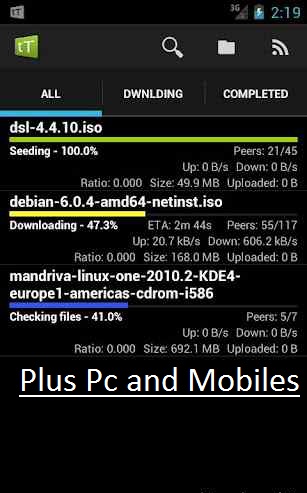
Hello Everybody, Torrrent is now most fames site for downloads.we all are very familiar with torrent as most of the internet user download there file using torrent client. For downloading torrent you need a client installed on PC but now you can easily download torrent file on your smart phone i.e., Android. You just need a tTorrent Lite(Download Below) app installed on your phone and you are done.


Step 1: Download tTorrent Lite Android app [Click Here]

Step 2: Once you have downloaded tTorrent Lite and installed it ion your android device you need to download required torrent file, its obvious that without torrent file what will you download, so do that first and save to your SD card or Phone memory.

Step3: Now open tTorrent Lite app and browse the torrent file which you had downloaded. 


Step 4: Once file is added click on Download tab your download will be started.

Step 5: With tTorrent Lite you can also increase and decrease upload speed.

Note : If you are using Wi-Fi you can also turn it on/off as per requirements.

Writer-Harpeet Insan(Author)
Enj@y W!th Our Site::..
How to Download Files From Torrentz in Android Mobile.Very-Very Easy!::.
Hello Everybody, Torrrent is now most fames site for downloads.we all are very familiar with torrent as most of the internet user download there file using torrent client. For downloading torrent you need a client installed on PC but now you can easily download torrent file on your smart phone i.e., Android. You just need a tTorrent Lite(Download Below) app installed on your phone and you are done.


Step 1: Download tTorrent Lite Android app [Click Here]

Step 2: Once you have downloaded tTorrent Lite and installed it ion your android device you need to download required torrent file, its obvious that without torrent file what will you download, so do that first and save to your SD card or Phone memory.

Step3: Now open tTorrent Lite app and browse the torrent file which you had downloaded. 


Step 4: Once file is added click on Download tab your download will be started.

Step 5: With tTorrent Lite you can also increase and decrease upload speed.

Note : If you are using Wi-Fi you can also turn it on/off as per requirements.

Writer-Harpeet Insan(Author)
Enj@y W!th Our Site::..